Put your photo on a white background
Product shots, profile pictures and catalogue photos on pure white, at the full size of the original. Free, and the photo never leaves this device.
A white background in three steps
- Drop the photo. White is already chosen on this page, so the result appears on white as soon as it is ready.
- Check the outline in the compare view. If a thin grey rim from the old background shows against the white, move Edge shift one pixel below zero.
- Download. JPG is selected because it is the smallest file for a photo on a solid colour. Switch to PNG or WebP if the place you upload to prefers them.
Pure white means #FFFFFF
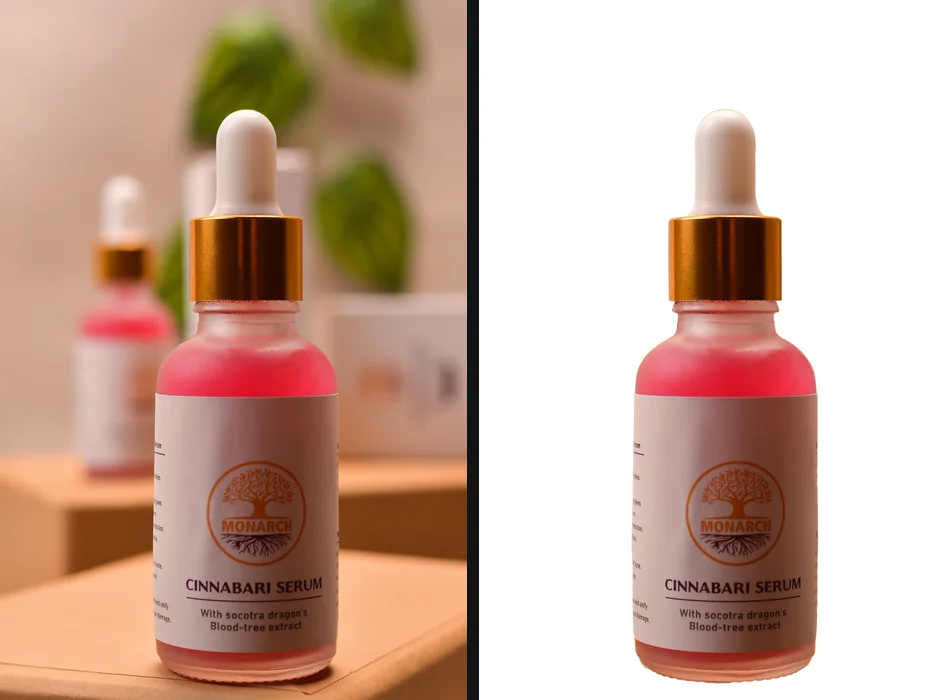
The White swatch is exactly #FFFFFF, red, green and blue all at 255. That matters more than it sounds. A product photographed on a white sweep usually comes out light grey, somewhere around 240, because paper and fabric are never lit perfectly evenly, and a marketplace that asks for pure white treats that grey as a background colour. Brightening the whole photo until the sweep turns white also washes out the product. Replacing the background keeps the product exactly as it was shot and makes everything around it true white.
Off-white has its place. A lookbook, a portfolio or a brand with a warm palette may want a cream or a very light grey, and the colour picker in the Background panel takes any hex value. For listings, stick to pure white.
Product photos for Amazon, Etsy, eBay and Shopify
Amazon is the strict one: the main image of a product must sit on pure white and fill most of the frame, and a listing can be suppressed when it does not. Amazon product image requirements goes through the rules as Amazon states them. Etsy, eBay and Shopify recommend a clean, consistent background rather than demanding one, and each has its own sizes and quirks, including one that shows a transparent PNG on black. Product photos on a white background compares all four.
getPNG does the background and keeps the photo's own width and height. It does not crop, pad to a square, resize or add a shadow, so if a marketplace wants a square image with the product filling 85 percent of it, finish that step in a free editor after downloading. The marketplace guides name one that runs in the browser too.
Headshots, team pages and profiles
A white background is the easy way to make a set of team photos taken in different rooms look like one shoot, and it suits profile pictures shown on white pages. It is less kind to very light blonde or white hair, which has little contrast against it, and on a white page a white background makes the photo lose its edge; a light grey often works better there. Which headshot background colour to use goes through the choices, and changing the background colour takes any other one.
Passport and ID photos
Be careful here. Many passport authorities, the US and the UK among them, do not accept a photo whose background has been changed digitally, whatever colour it ends up. Passport photo backgrounds explains what the rules say and how to get the background right when you take the photo. A white background from this page is fine for staff badges, student cards and memberships where edited photos are allowed.
Why it is free, and why the photo stays with you
The AI runs on your own device, in the browser, so a photo costs nothing to process and there is no server for it to be uploaded to. That is useful for product shots of things that are not launched yet and for photos of people who did not ask to be on someone else's server. After the first photo the page works offline, too.
Guides that go further
Part of cutouts for a purpose. Tested steps, the rules each place sets, and what to do when a cutout is not right.
- Product photos on a white background: the rules marketplaces shareA white background for product photos: pure white versus off-white, framing, shadows and sizes for Amazon, Etsy, eBay and Shopify, checked September 2026.
- Amazon product image requirements: the main image, pure white and the 85 percent ruleAmazon product image requirements from Seller Central: pure white main image, 85 percent fill, sizes for zoom, file formats and why listings get suppressed.
- Etsy photo size and listing photos: sizes, thumbnails and backgroundsEtsy photo size from Etsy's own help: 2,000 pixels recommended, 635 minimum for search, thumbnail crops, and why a transparent PNG shows black on Etsy.
- eBay photo requirements: size, borders, backgrounds and the main photoeBay photo requirements from eBay's own help: 500 pixel minimum, 1,600 recommended, no borders or added text, and a clean white background that passes.
- Shopify product image size: square images, consistent backgrounds and limitsShopify image size from Shopify Help: 2,048 x 2,048 for square product images, the 20 MB and 25 megapixel limits, and one background across the store.
- Headshot background: the best colour, and whyThe best headshot background colour: grey, blue, white, black or office blur, matched to hair, clothes and use. Change yours free without uploading it.
Questions
How do I put a white background on a photo?
Drop the photo on this page. White is already selected, so the cutout appears on white as soon as it is ready. Download JPG for a small file, or switch to PNG.
Is the white exactly #FFFFFF?
Yes. The White swatch is RGB 255, 255, 255, which is the pure white marketplaces such as Amazon ask for on a main product image.
Will the photo keep its size?
Yes. The file you download has the same width and height as the photo you dropped. getPNG does not crop, pad to a square or resize, so do that step in an editor if a marketplace asks for a particular shape.
Can I use this for a passport photo?
Usually not. Many passport authorities, including the US and the UK, do not accept a photo whose background was changed digitally. Take the photo against a plain light wall instead, and use a white background here for badges, profiles and product photos.
Does the product need a shadow?
None of the big marketplaces requires one. getPNG does not add shadows; a cutout on pure white is what most listing rules describe.
Your photo never leaves this device
The AI runs in your browser, so there is no server that could receive the picture. You can check it: open the network tab while the background is removed, or switch the browser to offline after your first picture and remove another. How to check a site is not uploading your photos.