Short answer
A transparent PNG is a PNG whose pixels carry a fourth value, alpha, that says how see-through each one is. The checkered background you see behind it is not in the file: apps draw a grey and white grid to show where the picture is empty. If the checkerboard is still there when you place the PNG on a coloured page, it was painted into the pixels and the file is a fake transparent PNG.
A transparent PNG is a picture with holes in it: pixels that are fully or partly see-through, so a logo, a product or a person sits on whatever page, slide or photo you put it on, without a white box around it. The grey and white checkered background you see behind one in an editor is not part of the file. It is the app’s way of drawing nothing, and understanding that one fact explains most of the trouble people have with transparent PNGs.
This page is the overview. It explains what the transparency really is, why it sometimes shows up as a checkerboard, black or white, how to make and check one, and it links to a guide on each of those in depth. For the PNG format itself, getSVG has what a PNG file is and JPG vs PNG; this page does not repeat them.
What makes a PNG transparent
Every pixel in an ordinary picture has three numbers: how much red, green and blue. A transparent PNG adds a fourth, alpha, which says how opaque the pixel is. At full alpha the pixel is solid. At zero it is not there at all, and whatever is behind the picture shows through. In between, the pixel is partly see-through and mixes with the background: that is how a soft shadow, a glass bottle or a strand of hair can sit on any colour without a hard edge.
The picture does not have a background colour that is marked as invisible. The empty area is made of pixels with zero alpha, and their red, green and blue values are simply ignored. The alpha channel, in plain words goes one level deeper, including why two programs can store the same see-through pixel differently.
PNG is not the only format that can do this. WebP and AVIF carry an alpha channel as well, GIF can make one colour fully transparent but has no partial transparency, and JPG has no transparency at all. What a transparent background is compares them, and explains why PNG is still the one people ask for.
The checkered background is a display trick
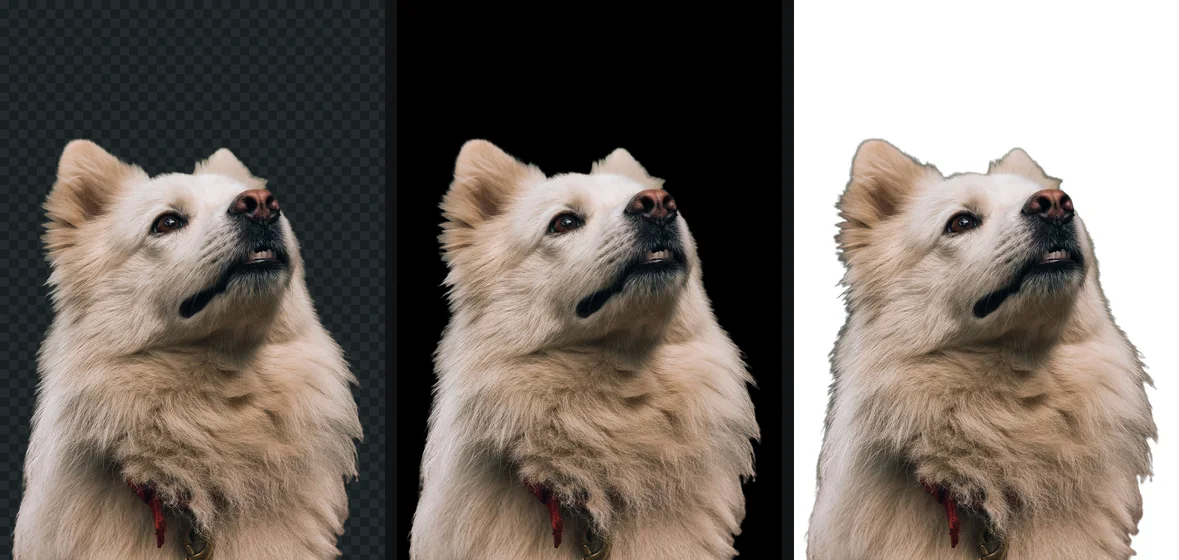
Nothing on a screen can show nothing. A monitor pixel always has some colour, so an app that displays a transparent picture has to decide what to draw where the picture is empty. Photoshop, GIMP, Procreate and many image viewers draw a grid of light grey and white squares. The grid is chosen because it is obviously not part of any real picture, and because both light and dark edges stay visible against it.
That convention has two consequences worth knowing.
The same file looks different in different places. In an editor you see the checkerboard. In a browser tab on its own, you usually see a plain dark or light page colour. On a web page you see the page. In a program that does not understand alpha, you see black or white. None of those are changes to the file.
A checkerboard can be faked. Because everybody knows what the grid means, a lot of pictures on free download sites show a checkerboard in the preview that is really painted into the pixels. You download a “transparent PNG” and place it on your slide, and the grid comes with it. The file is an ordinary opaque picture of a checkerboard. The fake transparent PNG shows how to spot one before you download it, and how to turn it into a real one.
Test whether a PNG is really transparent
- Open a new browser tab and drag the PNG into it.
- If the page behind it is light, also try it on something dark: a dark slide in PowerPoint or Keynote, or a dark frame in Canva.
- Look at the area around the subject.
You should see: a real transparent PNG shows the page or slide colour around the subject, and its edges blend into that colour.
If you do not: a grey and white grid means the checkerboard is painted into the pixels. A solid white or black box means the file has no transparency, or the app you placed it in flattened it.
Where a transparent PNG works
Transparency survives wherever the picture is placed as a PNG and drawn by software that understands alpha. In practice that covers most of the places people want it:
- Web pages, in every current browser, including as a CSS background.
- Design and layout apps: Canva, Figma, Photoshop, Illustrator, InDesign, Affinity, Procreate.
- Office documents: Word, PowerPoint, Keynote, Google Docs and Slides, when the picture is inserted from the file.
- Video editors and streaming overlays, for logos and lower thirds.
- Marketplace and shop builders that accept PNG uploads, although many marketplaces want the main photo on white anyway; that belongs to the cutouts for a purpose guides.
Where transparency is lost
Transparency is lost when something between you and the viewer converts the picture to a format without alpha, almost always JPEG, or draws it on a fixed colour. The usual suspects:
- Messaging apps and social networks that recompress photos to save space, usually to JPEG. The same PNG sent as a file or document often keeps its alpha.
- Email clients and some preview panes that show the picture on black or white.
- Old image viewers and a few built-in thumbnail generators that ignore alpha, which is why a PNG can look black in a folder and fine when opened.
- Saving or exporting as JPG anywhere in the chain, including a “Save as” that defaults to JPG.
- A frame or artboard fill in design apps, which is exported as part of the picture.
Why a PNG shows a black or white background goes app by app, with the fix for each. The short version: when the transparency disappears, check the file in a browser tab before you remake it. Usually the file is fine and something downstream flattened it.
How to make a transparent PNG
There are three routes, and which one fits depends on what you start with. A photo of a person, a pet or a product needs the subject found and cut out: an AI cutout does it in seconds, a manual selection in an editor takes minutes to an hour. A flat logo on white needs the white made transparent, which is a simpler job, and a logo is often better turned into a vector. And a picture you are designing from scratch only needs its background layer hidden before export.
How to make a transparent PNG walks through all three. If you already work in a particular app, the guides for removing a background in any app cover the steps in Photoshop, GIMP, Canva, PowerPoint, on iPhone and more, including the export settings that keep the transparency.
Edges: where a transparent PNG looks good or bad
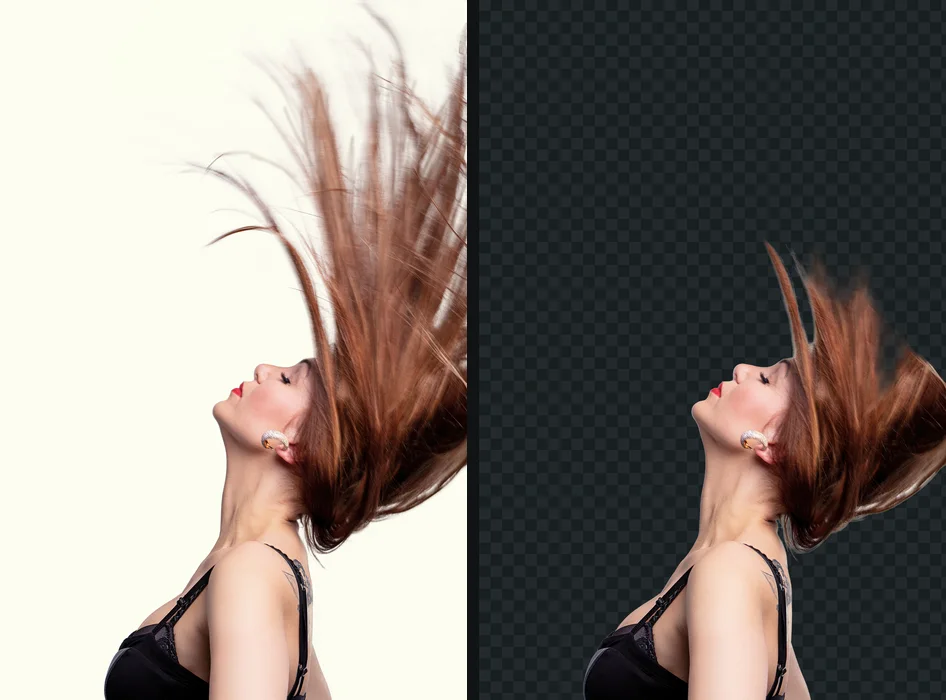
A cutout is judged at its edge. A good transparent PNG has an edge a pixel or two wide where alpha goes smoothly from solid to clear, so the subject sits naturally on any colour. A bad one has one of two faults.
A hard, jagged edge comes from a selection that only knew inside and outside. Every edge pixel is fully solid or fully clear, so curves show steps and hair looks trimmed with scissors. The fix is partial transparency at the edge, which is what feathering and soft masks add.
A light or dark rim comes from the old background. The edge pixels were a mix of subject and background in the original photo, and their colour still carries some of that background. On a background of the same colour it is invisible; on a contrasting one it shows as a halo. White halos and jagged edges after a cutout explains both and how to trim them.
Hair is the hardest case, because a strand is often thinner than a pixel. The honest measure of any background remover is how it handles the space between strands.
File size
A transparent PNG is lossless: it stores every pixel exactly. For a logo or an icon that is ideal, and the file is small. For a cutout of a photograph it means a large file, because photographic detail does not compress well without loss, and a cutout of a 12 megapixel photo can easily be 10 MB or more. The empty area costs very little; the subject costs a lot.
When size matters, on a web page for example, WebP with transparency keeps the alpha channel and is usually several times smaller at a quality nobody can tell apart. getSVG’s WebP vs PNG vs JPG covers that choice. Keep the PNG as your master copy either way, since each lossy save throws something away.
Privacy when making one online
The quickest way to get a transparent PNG from a photo is a background remover website, and most of them upload the photo to their servers to do it. For a product shot that may not matter. For a photo of your children, a passport scan or a client’s unreleased product, it should be a decision rather than a side effect. Is it safe to upload photos online summarises what the popular converters and removers say in their own policies, and how to check a website is not uploading your photos shows how to see it for yourself in the browser’s network tab, in about two minutes.
If you would rather hire the work out, clipping path versus image masking explains what retouching studios mean by each and when you need which.
The free way
A real transparent PNG from any photo
Drop a photo on getPNG and download a transparent PNG at the full resolution of the original, with the edge refined against the full-size picture so hair and fur stay soft. You can also save it as WebP with transparency, or as a JPG, PNG or WebP on white, black or any colour. Edge shift and Feather trim or soften the outline instantly, and the compare view puts the original beside the cutout. Free, no account, no watermark.
Transparent PNGs, explained: every guide
What transparency is inside an image file, why a transparent picture sometimes shows up black, white or checkered, how to make one properly, and how to tell which websites upload your photos to do it.
- What is a transparent background, really?Alpha, the checkerboard as a display convention, and which formats keep it
- How to make a transparent PNG: three ways that workThree ways to make one, from a one-click cutout to a manual mask
- Alpha channel, in plain wordsThe fourth number in every pixel, and straight versus premultiplied alpha
- The fake transparent PNG: how to spot one, and how to fix itA checkerboard painted into the pixels: how to spot one and fix it
- Why your PNG shows a black or white background (and how to keep it transparent)Viewers, email, Office and chat apps that flatten transparency
- White halo or jagged edges around a cutout: why it happens and how to fix itColour fringes, feathering and edge shift, and why they happen
- Clipping path vs image masking: what retouchers mean, and what it costsThe retouching vocabulary, for anyone hiring the work out
- Is it safe to upload photos to online converters and background removers?What popular converters and background removers do with your file
- How to check that a website is not uploading your photosThe network tab and offline mode: proof you can run yourself
The tools for this: Make a transparent PNG from any photo, Remove a white background.
Questions
Why does my transparent PNG have a checkered background?
In an editor or a viewer, the checkerboard is how the app shows empty pixels, and it is not saved in the file. If the grid appears on a web page, in a document or in Canva, it has been painted into the picture as real grey and white pixels, which is common with free stock downloads. That file is not transparent at all.
How do I know if a PNG is really transparent?
Place it on something coloured. Drag it into a new browser tab, or onto a coloured slide or a dark document. A real transparent PNG shows the colour behind it; a fake one shows a white box or a checkerboard. Checking in the same app that drew a checkerboard proves nothing.
Why does my transparent PNG turn black or white?
Something on the way flattened it. Many viewers, email clients, chat apps and social networks convert pictures to JPEG, which cannot store transparency, and fill the empty area with black or white. The PNG itself is usually fine; send it as a file instead of a photo.
Can a JPG be transparent?
No. A JPG pixel has only red, green and blue values, with no place for alpha, in any version of the format. Saving a transparent picture as JPG always fills the background with a colour. Use PNG, WebP or AVIF instead.
Is a transparent PNG bigger than a normal one?
An alpha channel adds a fourth value per pixel, but empty areas compress to almost nothing. A cutout of a photograph is still a large PNG, because PNG is lossless and photographs do not compress well without loss. WebP with transparency is often several times smaller for the same cutout.
What is the checkered background called?
It is usually called a transparency grid or checkerboard. Photoshop, GIMP, Procreate and many viewers draw one in light grey and white. It is a display convention, not a standard: some apps use a dark grid, a solid colour, or nothing at all.