Remove the background from a logo
A transparent PNG of your logo, from a file with a solid background or a photo of a sign, a shirt or a sheet of paper. Free, and the artwork never leaves this device.
Two kinds of logo, two kinds of job

A logo file with a background, a JPG someone emailed, a screenshot, an export with a white or coloured box behind it, only needs the box removed. The edges are clean, the colours are flat, and the result can be very good. A photo of a logo, on a sign, a van, a shirt or a business card, is harder: the lighting is uneven, the surface has texture, and the logo is often at an angle. getPNG handles both the same way, by finding the logo as the subject and fitting the edge to the real pixels at full resolution, but the photo needs more checking afterwards.
How to remove the background from a logo
- Crop close first if the logo is small in a big photo. The model does best when the logo is clearly the main thing in the picture. getPNG does not crop, so use your phone's photo editor or any image editor.
- Drop the image on this page.
- Check the holes. The inside of an O, the gap in an A, the space between a symbol and the words: the background should show through all of them. Use the compare view and zoom in.
- Check the edge on black and on white in the Background panel. Pull Edge shift below zero by a pixel if a rim of the old background shows.
- Download PNG with the background set back to Transparent.
Where logos go wrong
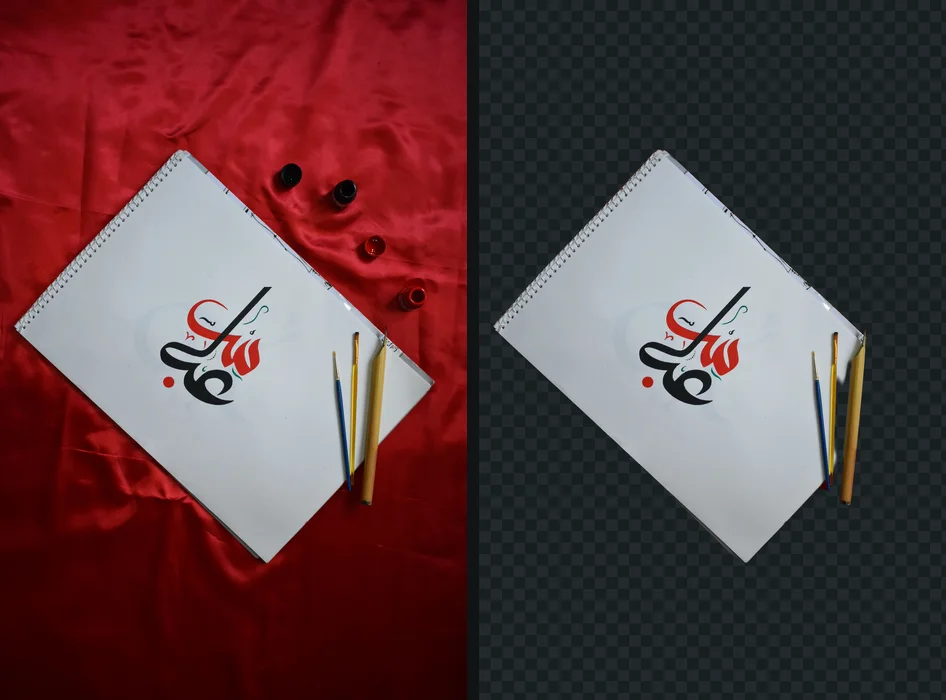
Enclosed shapes. A model trained to find a subject sometimes keeps the background inside a closed letter as part of it. It is the most common fault on logos with a lot of lettering. Thin text. A small tagline under a bold symbol can lose strokes or keep a haze around them. A logo that is the same colour as its background, embossing, a white logo on a light wall, gives the model little to go on. For any of these, the honest answer is that a tracing tool does better than a background remover, because it separates by colour rather than by subject.
From transparent PNG to vector
A transparent PNG is right for slides, documents, email signatures and most websites at one size. A printer, a sign maker, an embroiderer or anyone scaling the logo up needs a vector: an SVG or a PDF that stays sharp at any size. getSVG, getPNG's sibling tool, traces a PNG into clean vector paths in the browser, with the same no-upload promise. Download the PNG here, then open it in getSVG's logo to vector. For a photo of a logo, this two-step route usually beats tracing the photo directly, because the background is already gone.
A logo on paper, a wall or a shirt, to a clean PNG and then a vector covers the whole route, including straightening a logo shot at an angle. If you work in Adobe's apps, removing a background in Illustrator explains which of its tools suits a logo and which does not.
The fringe around a logo
Flat logos show halos more than photos do, because their edges are sharp and their colours are solid, so any leftover pixel of the old background is easy to see. The fix is the same: shrink the outline by a pixel and check it on a colour opposite to the old background. White halos and jagged edges after a cutout explains why the rim is there at all.
Logos that are not public yet
Agencies and in-house designers handle logos under embargo all the time: a rebrand before launch, a client's artwork under an agreement. Most online removers upload the file to a server to process it. getPNG removes the background inside your browser tab, and nothing is sent anywhere. Is it safe to upload images to online tools? compares what the popular services say they do with uploads.
Guides that go further
Part of cutouts for a purpose. Tested steps, the rules each place sets, and what to do when a cutout is not right.
- How to make a logo transparent, even from a photoHow to make a logo transparent, from a file or a photo of paper, a sign or a shirt: fix the angle, save a transparent PNG, then trace a vector with getSVG.
- White halo or jagged edges around a cutout: why it happens and how to fix itWhy a cutout gets a white halo or jagged edges, and how to fix it: shrinking the edge, feathering, and colour decontamination in Photoshop, Photopea and GIMP.
- How to remove a background in IllustratorHow to remove a background in Illustrator: the Remove Background button, a clipping mask, or Image Trace for logos, and exporting a transparent PNG.
- Sticker PNG: make stickers from your own photosMake a sticker PNG from any photo for iPhone Messages, WhatsApp (512 x 512, 100 KB) or printing with a white outline. Official rules checked September 2026.
- Why your PNG shows a black or white background (and how to keep it transparent)Why is my PNG not transparent? Why a transparent PNG turns black or white in viewers, WhatsApp, Instagram, email and Office, and how to keep the transparency.
- Transparent PNG: what it is, where it works, and where it failsA transparent PNG stores see-through pixels, not a checkered background. How to tell a real one, where transparency survives, and where it turns white.
Questions
How do I remove the background from a logo?
Drop the logo on this page and download the PNG. It works on a logo file with a solid background and on a photo of a logo on paper, a wall or a shirt. Check the edges in the compare view first.
Why does my logo have a white fringe after removing the background?
The edge pixels still hold some of the old background colour. Move Edge shift one pixel below zero and look at the result on a dark background, which is where a fringe shows.
Should a logo be a PNG or an SVG?
A transparent PNG is fine for slides, documents and most websites at one size. For print, signage or anything that scales, use an SVG: open the PNG in getSVG, which traces it into vector paths.
Is it safe to upload a client logo here?
Nothing is uploaded. The logo is processed inside your browser tab and never sent to getPNG or anyone else, which matters for artwork that is not public yet.
Your photo never leaves this device
The AI runs in your browser, so there is no server that could receive the picture. You can check it: open the network tab while the background is removed, or switch the browser to offline after your first picture and remove another. How to check a site is not uploading your photos.