Short answer
A transparent background is the part of a picture that contains no picture: pixels whose alpha value is zero, so whatever sits behind the image shows through. It is not white and it is not the grey checkerboard, which editors only draw to show empty space. Only formats with an alpha channel can store it: PNG, WebP and AVIF fully, GIF as on or off, and JPG not at all.
A transparent background is the part of an image that is not there. The pixels around the subject are empty, so when you put the picture on a coloured slide, a web page or another photo, that colour shows through and the subject looks as if it was cut out with scissors and laid on top. Nothing white, nothing grey, no box.
That sounds obvious, and yet most of the confusion around transparent backgrounds comes from two things that look like one: the grey and white checkerboard that editors draw, and a white background that looks empty on a white page. This guide explains what a transparent background is inside the file, why you see it as a checkerboard, which formats can keep it, and how to check that yours is real.
A transparent background is a fourth number per pixel
A digital picture is a grid of pixels, and each pixel is stored as numbers. In a normal photo there are three: how much red, how much green, how much blue. Mix them and you get the colour of that pixel. There is no number for “nothing”, so every pixel of a normal photo is some colour, including the background.
A picture that can have a transparent background stores a fourth number for each pixel, called alpha. Alpha says how opaque the pixel is. In the common 8-bit form it goes from 0 to 255:
- 255: fully opaque. The pixel covers whatever is behind it.
- 0: fully transparent. The pixel is not drawn at all; its colour numbers are ignored.
- Anything in between: partly see-through. At 128 the pixel is roughly half its own colour and half the colour behind it.
A transparent background is simply a large area of pixels with alpha at 0. The interesting part is the in-between values along the edge of the subject. A good cutout does not jump from 255 to 0 in one pixel; it fades over a pixel or two, and across a whole zone where hair or fur thins out. That is what lets the subject sit naturally on any colour. The alpha channel, in plain words goes further into how those values are stored and why the edges matter so much.
Why you see a checkerboard
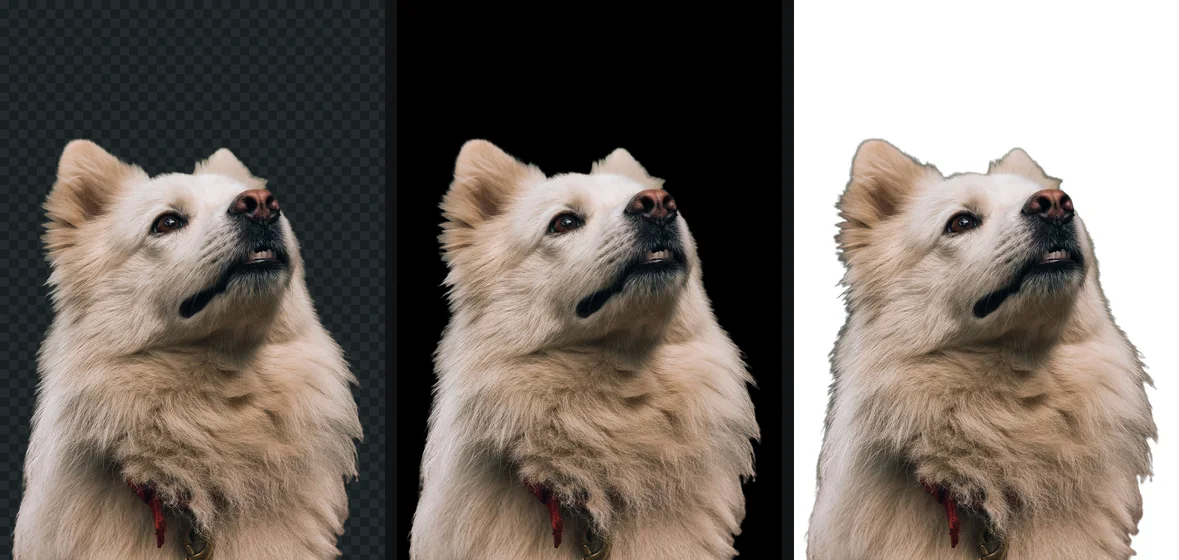
A screen cannot show nothing. Every pixel of a display is lit in some colour, so any app that shows a picture with a transparent background has to choose what to draw in the empty parts. Most image editors, including Photoshop, GIMP and Procreate, draw a checkerboard of light grey and white squares.
The checkerboard became the convention because it does a job no solid colour can. A white background hides white edges, a black one hides dark edges, and any colour could be part of the picture. A fine grey and white grid is obviously not part of any photo, and light and dark edges both stay visible against it.
It is only a display. The checkerboard is not stored in the file, and other apps draw other things: a browser tab showing a PNG on its own typically uses a plain dark or light page, a slide shows the slide colour, a web page shows the page. The picture is the same in all of them.
The flip side is that a checkerboard can be painted into a picture on purpose or by mistake, and then it is just grey and white pixels. Many “transparent PNG” downloads on free image sites are exactly that. The fake transparent PNG shows how to recognise one before you download it.
Transparent, white, and see-through: three different things
People use “transparent background” for three things that behave very differently.
| What you have | What the file contains | On a dark page |
|---|---|---|
| A transparent background | pixels with alpha 0 around the subject | the dark page shows around the subject |
| A white background | white pixels around the subject | a white rectangle around the subject |
| A picture with lowered transparency | every pixel partly see-through, subject included | the whole picture is faded, background and all |
The third one catches people in PowerPoint, Google Slides, Word and Canva, which all have a transparency or opacity slider for pictures. It fades the entire picture evenly, so the subject becomes a ghost and the background is still there, just fainter. It does not remove anything. Removing a background in Google Slides covers the case where that slider is the only tool on offer.
The white background is the other trap, because on a white page it is indistinguishable from transparency. A logo on white looks perfect on a white document and shows its box the moment it goes onto a coloured slide or a dark website.
Which file formats keep a transparent background
Only formats with an alpha channel, or at least a way to mark pixels as empty, can store a transparent background. The format you save in decides whether the transparency survives, whatever the editor showed you before you saved.
| Format | Transparency | Edges | Good for |
|---|---|---|---|
| PNG | full alpha, 8 or 16 bits | soft edges and shadows kept | cutouts, logos, anything you will edit again |
| WebP | full alpha, lossless or lossy | soft edges kept | cutouts on web pages, much smaller than PNG |
| AVIF | full alpha | soft edges kept | web pages, where supported by the tools you use |
| GIF | one colour marked transparent | on or off only, no soft edges | simple icons and animations |
| JPG | none | not possible | photos on a solid colour |
| SVG | transparent wherever nothing is drawn | shapes, not pixels | logos and icons as vectors |
A few notes on the table.
PNG is the format people ask for because every browser, design app and office suite reads its alpha channel, and because it is lossless: saving it again does not degrade it. getSVG’s what is a PNG file explains the format itself.
WebP and AVIF keep full alpha in a file that is usually several times smaller than a PNG of the same cutout. Every current major browser displays both. Support outside browsers is more patchy: some older desktop apps, email clients and upload forms still refuse them.
GIF can only say that one palette colour is invisible. Every pixel is fully there or fully gone, so a curved or hairy edge comes out jagged, and edges that were blended against white keep a white fringe on a dark page.
JPG has no place for a fourth number, in any version. A JPG cannot be transparent. When a program saves a transparent picture as JPG, it has to paint the empty area some colour, usually white, sometimes black. getSVG’s JPG vs PNG explains why.
Some other formats can carry transparency as well: TIFF and PSD can store alpha, and PDF supports transparent objects. HEIC, the iPhone’s photo format, can in principle hold an alpha channel, but photos from a camera never have one, because a camera records something in every pixel.
How to tell whether a background is really transparent
The only reliable test is to put the picture on something that is not white and not a checkerboard.
The coloured page test
- Open a new tab in your browser and drag the image file into it.
- Open a blank slide or document, set its background to a strong colour such as dark blue, and insert the image from the file.
- Look around the subject in both places.
You should see: the blue slide shows all the way up to the subject’s edge, and the edge blends into the blue without a pale or dark outline.
If you do not: a white rectangle means the background is white, not transparent. A grey and white grid means a checkerboard was painted into the pixels. A thin light outline means the cutout is transparent but carries a halo from the old background.
Two things to avoid when checking. Do not check only in the editor that made the file: it shows its own checkerboard, which proves the editor’s document is transparent, not that the saved file is. And do not check by sending the picture through a chat app first, since many of them convert pictures to JPEG on the way. If a picture was transparent in one place and black or white in another, why a PNG shows a black or white background explains which apps flatten it.
How to get a transparent background
A photograph never starts with one. The camera recorded something behind the subject, and that has to be removed: the subject is found, everything else gets alpha 0, and the edge gets the in-between values. You can do that by hand with selection tools in an editor, with the one-click remover some apps include, or with a dedicated background remover. For a flat logo on white, the job is simpler, because the background is one colour.
How to make a transparent PNG walks through those routes, and the transparent PNG overview covers where the result will and will not stay transparent. Before using an online remover, it is worth knowing whether it uploads the photo; is it safe to upload photos online summarises what the popular ones say.
Where a transparent background matters
- Logos on websites, slides, videos and merchandise mock-ups, where the colour behind them changes.
- Product cutouts placed on a coloured banner, a lifestyle scene or a shop’s own background.
- People in a thumbnail, a poster or a team page where everyone should sit on the same colour.
- Stickers and overlays, which only look like stickers when the space around them is empty.
It matters less when the destination demands a solid colour anyway. Many marketplaces want the main product photo on pure white, and many ID photo rules specify a plain light background. Even then, a transparent cutout is the best starting point, because you can put it on the exact colour required.
The free way
Get a real transparent background from a photo
Drop a photo on getPNG and the background is removed, leaving real alpha around the subject, with soft edge values where hair and fur thin out. Download it as a transparent PNG at the full resolution of the original, as WebP with transparency, or on white, black or any colour when the destination needs one. It reads JPG, PNG, WebP, AVIF, GIF and BMP. Free, no account, no watermark.
Questions
Is a transparent background the same as a white background?
No. A white background is made of white pixels, and it shows as a white box on any page that is not white. A transparent background has no colour: its pixels are empty, and the page, slide or photo behind the picture shows through.
Why is a transparent background shown as a checkerboard?
Because a screen cannot display nothing. Editors and viewers need to draw something where the picture is empty, and a grey and white grid is obviously not part of any real picture. The grid is not saved in the file. If it shows up when you place the picture on a page, it was painted in and the image is not transparent.
Which image formats support a transparent background?
PNG, WebP and AVIF store full alpha, so edges can be partly see-through. GIF can only make pixels fully transparent or fully solid. TIFF, PSD and PDF can hold transparency too. SVG is transparent wherever nothing is drawn. JPG cannot store any transparency.
Can a photo have a transparent background?
Not straight from a camera: a photograph records something in every pixel. The background has to be removed first, by selecting the subject in an editor or with a background remover, and then saved as PNG, WebP or AVIF.
What does transparent background mean in PowerPoint or Google Slides?
Usually the same as elsewhere: a picture whose empty area shows the slide behind it. The Transparency slider in those apps is different: it makes the whole picture see-through, subject included, and removes nothing.
Why does my transparent background turn black?
An app on the way ignored the alpha channel or converted the picture to JPEG. Pixels that were invisible get shown with whatever colour values they held, often black. The fix is usually in the app, not the file; send the PNG as a file rather than a photo.