Short answer
An alpha channel is a fourth value stored with every pixel, next to red, green and blue, that says how opaque the pixel is. In the usual 8-bit form it runs from 0 (fully transparent) to 255 (fully solid), and the values in between make soft edges, shadows and hair look natural on any background. Formats with an alpha channel include PNG, WebP and AVIF; JPG has none.
An alpha channel is the part of an image file that stores transparency. Every pixel in a picture already has three values, for red, green and blue; an alpha channel gives it a fourth, which says how opaque the pixel is, from completely see-through to completely solid. That single extra number per pixel is what makes a transparent background possible, and the values between the two extremes are what make a cutout look real instead of cut out with scissors.
This guide explains alpha in plain words: what the values mean, why the in-between ones matter more than the extremes, the two ways programs store alpha (straight and premultiplied) and what goes wrong when they disagree. There are a few numbers but no formulas.
The fourth number in every pixel
A digital image is a grid of pixels. In a normal photo each pixel is three numbers, one each for red, green and blue light, usually from 0 to 255. Every combination is some colour, so every pixel is some colour. There is no value for “not there”.
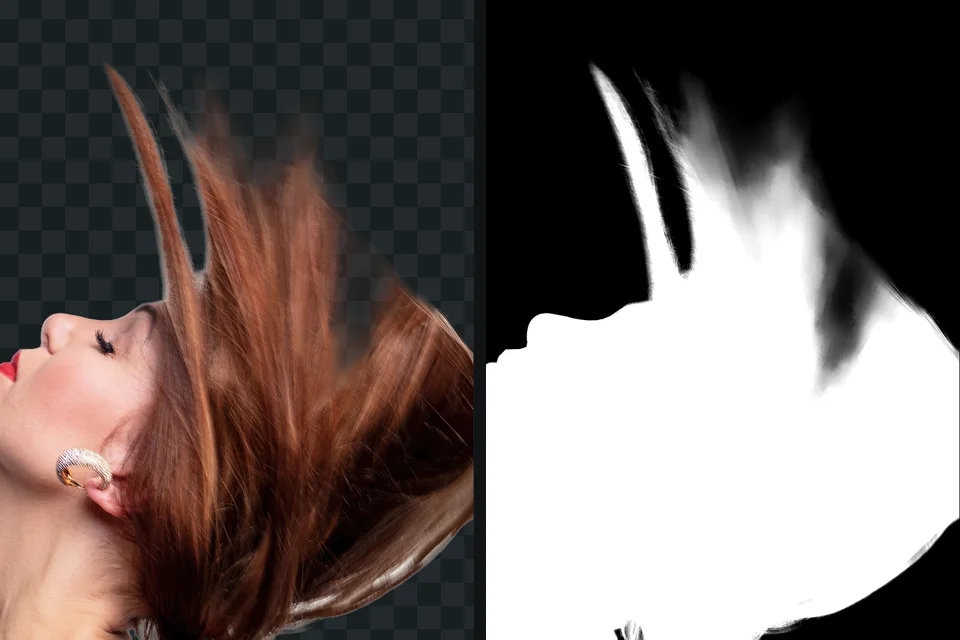
An alpha channel adds a fourth number per pixel. It is called a channel because it is stored like the colour channels: a full layer of values the size of the picture, one per pixel. On its own it looks like a greyscale image, white where the picture is solid, black where it is empty, grey where it is partly see-through. Many editors will show it to you exactly like that.
In the most common form, 8-bit alpha, the number goes from 0 to 255:
| Alpha value | Opacity | What you see |
|---|---|---|
| 255 | 100 percent | the pixel’s own colour, covering what is behind it |
| 191 | about 75 percent | mostly the pixel, a little of the background |
| 128 | about 50 percent | an even mix of the pixel and the background |
| 64 | about 25 percent | mostly the background, a trace of the pixel |
| 0 | 0 percent | nothing: the background shows through completely |
When an app draws the picture onto something (a web page, a slide, another photo) it blends each pixel with what is behind it in exactly that proportion. That blending is called compositing, and it happens every time a transparent picture is displayed.
Why the in-between values matter
If alpha only ever held 0 and 255, transparency would still work: the background would disappear. But the edge would look wrong, and the reason is how photographs record edges.
A camera sensor pixel does not stop at the edge of your subject. The pixels along an outline cover a little subject and a little background, and they record a mix of both. Hair is the extreme case: a strand can be much thinner than a pixel, so a whole zone around a head is made of pixels that are partly hair and partly wall. A good cutout reproduces that. Its alpha fades over a pixel or two along a clean outline, and over a wide, uneven zone around hair and fur.
Throw that away, by forcing every edge pixel to be either solid or empty, and three things happen:
- Curves show steps. Diagonal and round edges look jagged, the same stair-stepping you see on text without anti-aliasing.
- Fine detail vanishes or turns into a helmet. Strands of hair either disappear or are kept with the background between them.
- The background leaks. Edge pixels kept as fully solid still carry some of the old background’s colour, which shows as a halo on a new background. White halos and jagged edges after a cutout is about exactly this.
This is also why the uncertainty of a background remover at the edge is useful information, not noise. When a model is unsure whether a pixel belongs to the hair or the wall, that pixel usually is both, and a partial alpha value is the honest answer.
Bit depth: how many levels of transparency
The number of levels depends on how many bits the file uses for alpha.
- 1-bit (on or off). GIF works like this: one palette colour can be marked transparent, and every other pixel is fully solid. Edges are jagged, and a GIF made for a white page keeps a white fringe on a dark one. What a transparent background is compares the formats.
- 8-bit (256 levels). The standard for PNG, WebP and AVIF, and more than enough for smooth edges and soft shadows. Steps between 256 levels are invisible in practice.
- 16-bit (65,536 levels). PNG supports it, mostly used in professional and scientific work where every level of a gradient matters.
PNG has one more trick worth knowing: a palette PNG, with 256 colours or fewer, can give each palette entry its own alpha value. That is how a PNG optimiser can shrink a logo with soft edges without turning its edges hard. An optimiser that keeps only one fully transparent palette entry, the way GIF does, turns those edges hard again.
JPG has no alpha channel at all, in any version. getSVG’s JPG vs PNG explains the format side of that.
Straight and premultiplied alpha
Here is the part that trips up even experienced designers. There are two ways to store a partly transparent pixel, and they are both correct.
Straight alpha (also called unassociated) stores the pixel’s full colour and, separately, how see-through it is. A half-transparent red pixel is stored as full red, plus alpha at 50 percent. The colour and the transparency are independent: you could change the alpha and the red stays red.
Premultiplied alpha (also called associated) stores the colour already blended towards black by the amount of transparency. The same half-transparent red pixel is stored as half-strength red, plus alpha at 50 percent. The colour has the transparency baked in.
Why would anyone do the second? Because compositing, blurring and resizing are simpler and more accurate on premultiplied pixels, so graphics cards, browsers and video compositing software usually work that way internally. Files meant for exchange more often use straight alpha. PNG is defined with straight alpha, as is WebP; some formats, such as TIFF, can declare either, and video and visual-effects formats vary.
What goes wrong when they are mixed up
Nothing, as long as every program knows which kind it is reading. When one reads the other by mistake, the picture is still the right shape but the edges go wrong:
- Premultiplied read as straight. Edge colours were already darkened, and get blended again. Result: a dark fringe around the subject, most visible on a light background.
- Straight read as premultiplied. Edge colours are treated as if already darkened, and come out too bright. Result: a light, glowing fringe, most visible on a dark background.
In video and motion graphics this is common enough that editors such as After Effects let you tell them how to interpret the alpha of imported footage. With still images you mostly meet it after a picture has been through several tools: exported from one app, resized in a second, placed in a third. If a cutout looked clean where you made it and has a thin dark or light line somewhere else, a straight versus premultiplied mismatch is one of the suspects, next to plain colour contamination from the old background.
A related trap: in straight alpha, the colour of a fully transparent pixel is ignored, so it could be anything. Many programs store black there. An app that ignores alpha altogether shows those hidden colours, which is why a transparent picture sometimes turns up on a black background. Why a PNG shows a black or white background covers the apps that do this.
See the alpha channel of a picture
- Open a transparent PNG in GIMP or Photoshop.
- In Photoshop, Ctrl-click (Command-click on a Mac) the layer thumbnail to load its transparency as a selection, choose Select > Save Selection, then click the new channel at the bottom of the Channels panel. In GIMP, right-click the layer, choose Add Layer Mask with the option to transfer the layer’s alpha channel, then Alt-click the mask thumbnail.
- Look at the edge of the subject, especially around hair, at 400 percent zoom.
You should see: a smooth ramp of greys along the outline, and a wider, uneven grey zone where there is hair or fur. The background is black or shown as fully empty, the subject white or fully solid.
If you do not: if the edge jumps straight from solid to empty with no grey pixels, the cutout has hard alpha and will look jagged or haloed on contrasting colours. Softening it by a pixel helps outlines; it cannot recreate hair.
Alpha channel, layer mask, selection, clipping path
Four terms describe overlapping ideas, and they get used interchangeably.
- Alpha channel: the per-pixel transparency stored in a picture file.
- Layer mask: a greyscale image attached to a layer in an editor. White shows, black hides, grey is partly transparent. When you export, the editor turns it into alpha. It stays editable until then.
- Selection: a temporary area you are working on. In Photoshop, a saved selection is stored in the Channels panel and is also called an alpha channel, which is the source of much confusion; it does not make the picture transparent by itself.
- Clipping path: a vector outline that says which part of a picture shows. It is either inside or outside, so it gives a hard edge, and it is common in print workflows. Clipping path versus image masking explains when retouchers use which.
Alpha outside image files
The same idea turns up in other places. In CSS, colours can carry alpha (rgba and the alpha part of modern colour syntax), and the opacity property applies one alpha value to a whole element. Presentation apps have a transparency slider that does the same to a picture: it lowers the alpha of every pixel evenly, which fades the whole thing and does not remove a background. Video formats built for editing, such as ProRes 4444, can carry an alpha channel for overlays and titles; most delivery formats used for streaming cannot.
What this means when you make a cutout
- Save cutouts as PNG (or WebP with transparency) so the alpha is stored exactly. How to make a transparent PNG covers the routes.
- Keep the soft edge. A tool that thresholds alpha to solid or empty makes a smaller file and a worse picture.
- Check a cutout on both a dark and a light background. A dark fringe or a light glow points to contamination or an alpha mix-up; a light background hides one kind and a dark background the other.
- Resize and edit in tools that handle alpha properly, and keep a full-resolution master.
The free way
A cutout with a real, soft alpha channel
getPNG removes the background and writes a transparent PNG at the full resolution of the original. The edge is fitted to the real pixels of the full-size photo rather than enlarged from a small, blurred mask, so the alpha follows hair and fur the way the photo recorded them. Edge shift and Feather let you move or soften the alpha edge instantly, and WebP with transparency is there when you need a smaller file. Free, no account, no watermark.
For the wider picture of where transparent files work and where they get flattened, see the transparent PNG overview.
Questions
What is an alpha channel in simple terms?
It is a see-through setting for every single pixel. Alongside the numbers for red, green and blue, each pixel gets one more number saying how much of it covers what is behind. A picture with an alpha channel can have a transparent background and soft, partly see-through edges.
What is the difference between straight and premultiplied alpha?
With straight alpha, a pixel stores its full colour and, separately, how see-through it is. With premultiplied alpha, the colour has already been darkened in proportion to the transparency. Both describe the same picture; the trouble starts when a program reads one as the other, which shows as dark or light fringes around edges. PNG always uses straight alpha.
Does JPG have an alpha channel?
No. A JPG stores only colour, three values per pixel, and has no place for a fourth in any version of the format. A transparent picture saved as JPG gets its empty areas filled with a solid colour, usually white or black.
What is 8-bit alpha?
Alpha stored in 8 bits, which gives 256 levels of transparency from 0 to 255. That is enough for smooth edges and shadows in almost every picture. PNG can also store 16-bit alpha (65,536 levels), and GIF effectively has 1-bit transparency: each pixel is either there or not.
Is an alpha channel the same as a layer mask?
They carry the same kind of information, a grey value per pixel for how much shows. A layer mask lives in an editor and is attached to one layer, so you can repaint it. An alpha channel is how that transparency is stored in the saved picture. In Photoshop, the Channels panel also uses the name for saved selections, which is a third use of the word.
Why does my picture have a black background where it should be transparent?
An app is ignoring the alpha channel. Pixels that should be invisible are then shown with their stored colour, which in many files is black. The picture is usually fine; check it in a browser tab, and avoid apps that convert to JPEG on the way.