Short answer
A clipping path is a vector outline drawn with a pen tool around a subject with hard edges, such as a bottle or a phone; everything outside it is hidden. Image masking is a pixel mask with soft, partly transparent edges, used for hair, fur, glass and fabric; hair masking is its hardest form. Published price lists start around 40 US cents for a simple path and about 1 to 2 dollars for masking.
Clipping path and image masking are the two words you meet the moment you look into paying someone to cut out product photos or portraits. Retouching studios list them as separate services at separate prices, with extras such as hair masking, multi-clipping paths and alpha channel masking. They are not marketing jargon: they describe two genuinely different ways of separating a subject from its background, each suited to a different kind of edge.
This guide explains what each term means, how to tell which one your photos need, what published price lists charge for them, and when an AI cutout gives you the same result without sending the pictures anywhere.
What a clipping path is
A clipping path is a vector outline drawn around the subject, usually with the Pen tool in Photoshop. The retoucher places anchor points along the edge and bends the segments between them into curves, until the path hugs the outline. The path is then used to hide everything outside it.
Because a path is a mathematical shape, its edge is perfectly clean and can be scaled without losing sharpness. It is stored in the image file as a path (in a PSD, a TIFF or a JPEG with an embedded path), and page layout programs such as InDesign can use it to show the product without its background, even when the image itself still has one. That is where the name comes from: the image is clipped to the path.
It is the same geometry an SVG is made of: anchor points and curves rather than pixels, which is why a path scales and a cutout does not. getSVG’s raster versus vector explains that split, and its vector glossary defines the words a retoucher will use in a quote.
A clipping path suits subjects with hard, well-defined edges: bottles, boxes, phones, shoes, furniture, cars, jewellery with clean outlines. It does not suit anything soft. A path is either inside or outside; it cannot make a pixel half transparent, so hair, fur, fluffy fabric and glass come out with a hard, cut-out edge.
Variations on price lists
- Basic, simple, medium, complex, super complex: tiers by how many anchor points and holes the outline needs. A ball is basic; a bicycle, with its spokes and gaps, is complex or above.
- Multi-clipping path: several paths in one image, one per part (a shirt’s collar, sleeves and body), so each can be recoloured or adjusted separately.
- Clipping path with shadow: the product cut out and placed on white with a natural or drop shadow added back.
What image masking is
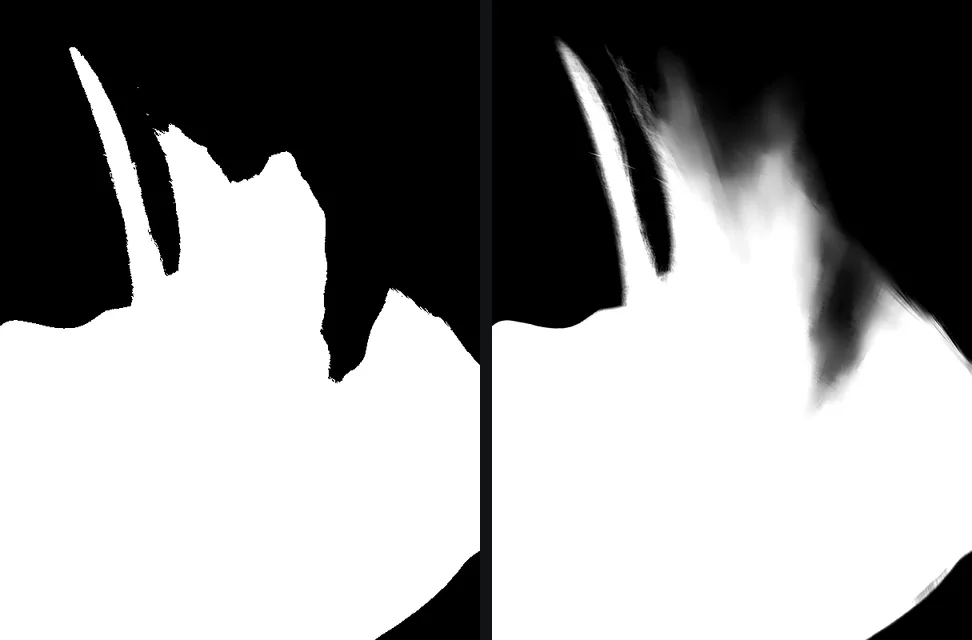
Image masking hides the background with a pixel mask rather than a vector shape. The mask is a greyscale picture the same size as the photo: white keeps a pixel, black hides it, and every grey in between makes it partly transparent. Because each pixel can be anything from fully kept to fully hidden, a mask can follow a single hair, the soft edge of a knitted jumper or the see-through rim of a wine glass.
Retouchers build masks with a mixture of tools: channel-based selections (picking the colour channel where the subject contrasts most with the background), selection refinement such as Photoshop’s Select and Mask, brushes painted by hand, and increasingly AI selections as a starting point. The result is a layer mask in a PSD, or a transparent PNG, whose alpha channel is that mask. The alpha channel guide explains what those grey values do.
Variations on price lists
- Hair masking: masking for hair and fur, the most time-consuming everyday job and usually priced above clipping paths.
- Alpha channel masking: the mask delivered as a saved channel in the file, often for subjects whose colour is close to the background’s.
- Layer masking: the mask attached to a layer in a PSD, so the cutout can be adjusted later.
- Transparent or translucent masking: glass, veils, smoke and water, where the subject itself should be partly see-through.
Clipping path vs image masking, side by side
| Clipping path | Image masking | |
|---|---|---|
| What it is | a vector outline | a greyscale pixel mask |
| Edge | hard and perfectly clean | soft, can be partly transparent |
| Best for | products with defined outlines | hair, fur, fabric, glass, smoke |
| Delivered as | path in a PSD, TIFF or JPEG | layer mask, alpha channel, or transparent PNG |
| Scales without loss | yes, the path does | no, the mask is pixels |
Many real jobs need both. A model holding a handbag might have a path around the bag and a mask for her hair, and studios often quote such images as combined work.
What it costs
Retouching is sold per image, and the price depends on complexity, volume and turnaround. As an example of what published price lists said on 16 September 2026:
- Clipping Path Source’s pricing page listed clipping paths from 39 US cents per image for basic shapes (a simple bottle), through about 1.29 dollars for medium subjects (shoes, a bag with a chain) and 2.99 dollars for complex ones, to 10.99 dollars for super complex subjects such as mesh or furniture with many cut-outs. Its hair masking tiers ran from under 2 dollars for simple hair or fur to 8.99 dollars for feathers, crowds or pine needles.
- Clipping World’s image masking page listed layer masking from 1 dollar per image, alpha masking from 1.10 dollars and transparent masking from 1.50 dollars, with a turnaround of 24 to 48 hours and discounts for bulk orders.
Those are starting prices from two of many providers, and quotes for real batches vary, but the shape is consistent: a simple path costs well under a dollar, masking costs one to a few dollars, and hard hair or intricate objects cost several. For a shop with 300 products photographed from three angles, that is the difference between a few hundred and a few thousand dollars, plus a day or two of waiting for each batch.
Sending photos to a retoucher: the privacy side
Outsourcing retouching means sending your originals to another company, often in another country, and often through a file transfer service. For catalogue shots of products already on sale, that is rarely a concern. For unreleased products, client work under a confidentiality agreement or portraits of people, it is worth asking a studio a few plain questions before you send anything:
- Where are the files stored while they work on them, and who can access them?
- How long do they keep originals and results after delivery, and can they delete them on request?
- Do they use subcontractors or freelancers?
- Will they sign a confidentiality agreement?
The same questions apply to online tools that upload your photos. Is it safe to upload photos online? compares what several popular services say in their own policies.
When an AI cutout replaces both
For a large share of everyday work, AI background removal now produces what a retoucher would deliver as image masking: a soft-edged mask, with partial transparency where the subject meets the background. A person against a wall, a dog on a lawn, a product on a table: a good model gets the outline right in seconds, and hair comes out as hair rather than a hard helmet.
What separates good AI results from poor ones is mostly what happens after the model. Models run at a fixed size, and a mask stretched to fit a large photo turns soft. getPNG runs its model at 1024 pixels and then fits that answer to the real edges of the full-size photo with a guided filter, so the cutout comes back at the full resolution of the original with the soft edge values kept. Edge shift and Feather then adjust the outline without running the model again, which covers the most common retoucher’s correction, pulling the edge in by a pixel to lose a light fringe. White halos around cutouts shows when that works.
The free way
Try a cutout before you order a batch
Drop one of your product photos or portraits on getPNG and compare the result with the original using the compare view. You get a transparent PNG at full resolution, or a JPG on white, free and in seconds, and you will know which of your pictures still need a retoucher.
Decide which photos need a human
- Pick five representative photos: your simplest product, your most intricate one, one with hair or fur, one with glass or shine, and one on a busy background.
- Cut out each one with an AI remover and put it on white and on a dark colour.
- Zoom to 200 per cent on the hardest part of each edge.
You should see: clean results on the simple product, the person or pet, and the busy background, with at most a pixel of Edge shift needed. Those categories do not need paid masking.
If you do not: gaps inside intricate objects, a see-through glass that went solid, or hair with a heavy fringe are the images to send to a retoucher, now priced per image for only the hard cases.
When it is still worth paying a retoucher
AI is not the answer to everything, and a good studio earns its fee in these cases:
- You need a real vector path. Print catalogues and layout workflows that rely on a path embedded in the file need someone to draw it. A transparent PNG is a mask, not a path. (Photoshop can turn a selection into a work path, but a path traced from a soft mask is rarely as clean as one drawn by hand.)
- Intricate hard-edged objects. Bicycles, chairs with slats, jewellery chains and mesh have many enclosed holes, and each one needs to be exactly right.
- Glass, liquid and transparent packaging. These need translucent masking and often rebuilt reflections.
- Consistency across a catalogue. Matching shadows, identical margins, colour correction and ghost mannequin work for clothing are retouching services in their own right, well beyond background removal.
- Volume with a deadline. Hundreds of images a week, delivered in a fixed specification, is exactly what studios are set up for. getPNG processes one picture at a time and has no batch mode.
- Hand corrections. getPNG has no brush yet for restoring or erasing an area by hand; if the model misses part of a subject, that fix needs an editor or a person.
How to brief a retoucher so the result is usable
Whether you hire a studio or a freelancer, a clear brief avoids a second round:
- Say what the output is for: a marketplace listing, a print catalogue, a website. That decides path or mask.
- Name the file format: PSD with path, PNG with transparency, or JPG on white (and say pure white, RGB 255, 255, 255, if a marketplace requires it; product photos on a white background covers the common rules).
- Specify size and margins: final pixel dimensions, and how much space around the product.
- Say whether you want shadows: none, natural or drop shadow.
- Send one test image first, and check it on a dark background at 200 per cent before approving the batch.
- Agree on file handling: where originals go, and when they are deleted.
Knowing the vocabulary means you pay for the edge your photos actually need: a path for the bottle, a mask for the hair, and nothing at all for the pictures a free cutout already gets right.
Questions
What is the difference between a clipping path and image masking?
A clipping path is a vector outline: a hard-edged shape made of anchor points and curves, ideal for products with clean outlines. Image masking uses a pixel mask with shades of grey, so the edge can be partly transparent, which is what hair, fur, smoke and glass need. Paths are faster to draw on simple shapes; masks are the only way to keep soft detail.
What is hair masking?
Hair masking is image masking applied to hair or fur: separating individual strands from the background with partial transparency, so the subject can go on a new background without a helmet-like outline. It is usually priced higher than a clipping path because it takes more time and skill.
How much does a clipping path service cost?
Published price lists checked on 16 September 2026 start at about 40 US cents per image for simple shapes and reach about 11 dollars for intricate objects with many holes, such as wire furniture or mesh. Hair masking was listed from under 2 dollars to about 9 dollars. Volume discounts and turnaround time change the price.
Is a clipping path better than AI background removal?
For products with hard, geometric edges, a hand-drawn path is still the most exact outline and can be delivered as a vector for print layouts. For people, pets and anything soft, a good AI cutout gives a mask with soft edges in seconds that is comparable to routine hand masking. A practical approach is to start from an AI result and send only the failures to a retoucher.
What is an alpha channel mask?
It is a mask stored as an extra greyscale channel in the image file: white where the subject is kept, black where it is removed, grey where it is partly transparent. A transparent PNG carries the same information as its alpha channel, which is why a PNG cutout is effectively a masked image.